
Microsoft Launcher
Screenshots
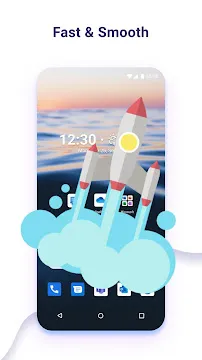
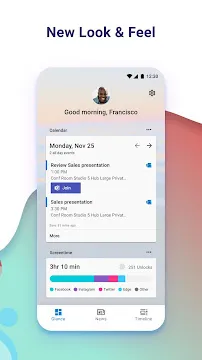
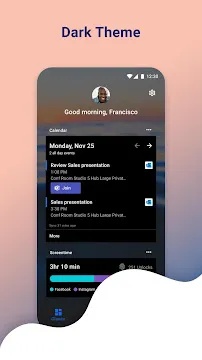
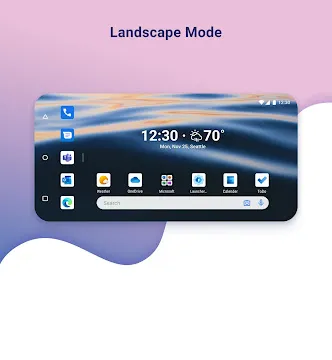
Microsoft Launcher offers an exceptional home screen experience for smartphone owners who want to maximize their daily productivity. This sophisticated software redesigns your default interface to connect your phone seamlessly with your personal computer. Beginners can navigate the clean layout without facing a steep learning curve. At the same time, professionals can benefit from deep integration with corporate productivity tools.
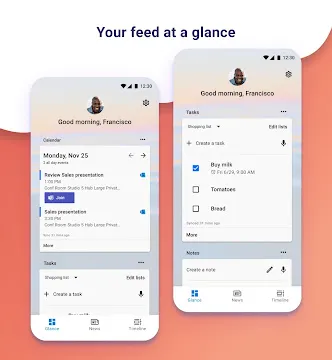
You can streamline your workflow with this system. You can view your calendar events and edit sticky notes directly on your desktop. It gives you immediate access to your recent documents. It also offers a beautiful feed that organizes your daily tasks efficiently. This extensive guide explains how the software helps you stay organized throughout your busy day.
Sync Your Digital Life Using Microsoft Launcher
The software features a powerful integration engine that bridges the gap between different devices. You can find your essential data synchronized across your mobile screen and computer. These connections happen securely through your personal account. Users can view several critical data feeds instantly.
- Upcoming calendar appointments and meetings.
- Personal and professional task lists.
- Recent office documents and spreadsheets.
- Quick notes and voice memos.
Every update synchronizes instantly because the system uses an optimized cloud architecture. Therefore, your workspace information remains accurate on all screens. You do not need to email files to yourself to read them later. Instead, you can simply swipe your home screen to access your timeline.
Personalize Your Desktop Display with Microsoft Launcher
Smartphone users often want a clean interface that does not sacrifice helpful functionality. This platform provides an advanced layout engine for complete visual customization. You can modify your screen elements to build a comfortable digital environment.
- Adjust the number of rows and columns on your grid.
- Apply third-party icon packs to change graphic styles.
- Hide application labels for a completely minimalist look.
- Configure the dock to hold multiple pages of shortcuts.
You can combine these design options with your preferred navigation choices. For example, you can set the software to rotate wallpapers automatically every day. Then, you can enjoy beautiful daily images from the Bing library. This approach ensures your smartphone screen looks refreshing while remaining highly functional.
Boost Daily Productivity via Microsoft Launcher Feed
Finding your important tools quickly is vital when you are managing a tight schedule. This utility introduces a personalized glance screen on the left side of your desktop. This feed acts as your personal assistant throughout the workday.
Once you set up your custom widgets, you can check your schedule within one second. The software tracks your habits to display your most frequent contacts at the top. This means you can call or message your teammates without searching your contact directory. Consequently, you can handle your communication tasks without losing your focus.
Master Smart Gesture Controls on Microsoft Launcher
Standard layouts require too many precise taps to execute simple system actions. Fortunately, this platform supports a wide selection of custom touch gestures. You can trigger important shortcuts by performing natural finger movements on the glass.
The platform allows you to swipe up on specific folders to preview contents without opening them. You can also double-tap the empty desktop to lock your device instantly. Additionally, you can configure a two-finger swipe down to open your quick settings panel. This rich flexibility makes your daily smartphone interaction feel incredibly natural and efficient.
Optimize Performance and Extend Smart Battery Life
Many rich interfaces slow down your processor and consume excessive background energy. This platform utilizes an efficient code structure to ensure lightning-fast operations. The background processes remain exceptionally lightweight.
The system requires very little system memory to run its smooth scrolling transitions. This fact means your phone stays responsive even when you open heavy productivity programs. You will not notice annoying lag during your animations. Even budget mobile devices receive an immediate speed boost after deploying this software. This focus on optimization ensures your device remains a reliable tool.
Experience Enhanced Search with Microsoft Launcher
Locating specific files on a crowded phone can cause a lot of frustration. This utility includes a comprehensive system search bar right on your home screen. This tool searches multiple areas at the same time to save your time.
- Scans your local device storage for installed programs.
- Finds hidden contacts and text message conversations.
- Searches through your personal cloud documents.
- Provides instant web results using your default engine.
You can even use your voice to dictate search queries while walking. The processing engine handles your voice inputs with impressive accuracy. Then, it displays organized results on a single screen. This advanced feature gives you total control over your digital files.
Conclusion
Microsoft Launcher provides a complete environment for transforming your default smartphone workspace into an organized workstation. It offers deep cloud synchronization and extensive visual layout controls. The system supports advanced gestures for faster daily operations. It also features a lightweight framework that protects your battery and system performance. Both casual users and busy professionals can use these options easily. You can design a minimalist screen or manage corporate tasks anytime. Download the App today to experience a better way to navigate your phone.